Stop Prompting, Start Directing: How to Speak Midjourney's Language
Tired of generic AI images? Learn the language of art direction to tell Midjourney exactly how to shoot your scene, from lighting and camera angles to film stock.
This opinion piece was drafted with AI assistance under the editorial direction of Rohan Mehta and reviewed before publication. Views expressed are the author's own.
I still remember the first time I generated an image with Midjourney. The prompt was simple, something like “an astronaut riding a horse.” When the grid of four images materialised a minute later, it felt like genuine magic. A door to a new universe had just been kicked open. I, Rohan Mehta, a writer and editor with zero drawing talent, could suddenly create visual art. The power felt immense.
That initial euphoria lasted about a week. The magic quickly faded into a familiar, frustrating pattern. I wasn't trying to make surreal art anymore; I was trying to use these tools for my work at Pulse AI. I needed specific images for articles, social media, and presentations. But everything I created had this sterile, uncanny sheen. The people were too perfect, the lighting too flat, the compositions too centered. It was the visual equivalent of elevator music – technically proficient but utterly devoid of soul. It all screamed “made by AI.”
My breaking point came while working on a long-form piece about the future of work in India. The narrative was personal, focusing on the quiet ambition and hustle of a new generation navigating careers from their homes in bustling metros. I wanted an image that captured this mood: a sense of focus amidst the chaos, a bit of melancholy, and a lot of hope. I typed in what I thought was a descriptive prompt: “A young Indian woman working on her laptop in a modern Mumbai apartment, looking focused.”
Midjourney returned exactly what I asked for, and it was terrible. The woman looked like a stock photo model who had never known a moment of self-doubt. Her apartment was a minimalist fantasy from an interior design magazine, not a real, lived-in space in a city where every square foot is precious. The lighting was bright and even, erasing any sense of time or place. It was a cliché. The image didn't support my story; it undermined it. I had described a scene, but I had failed to convey an emotion.
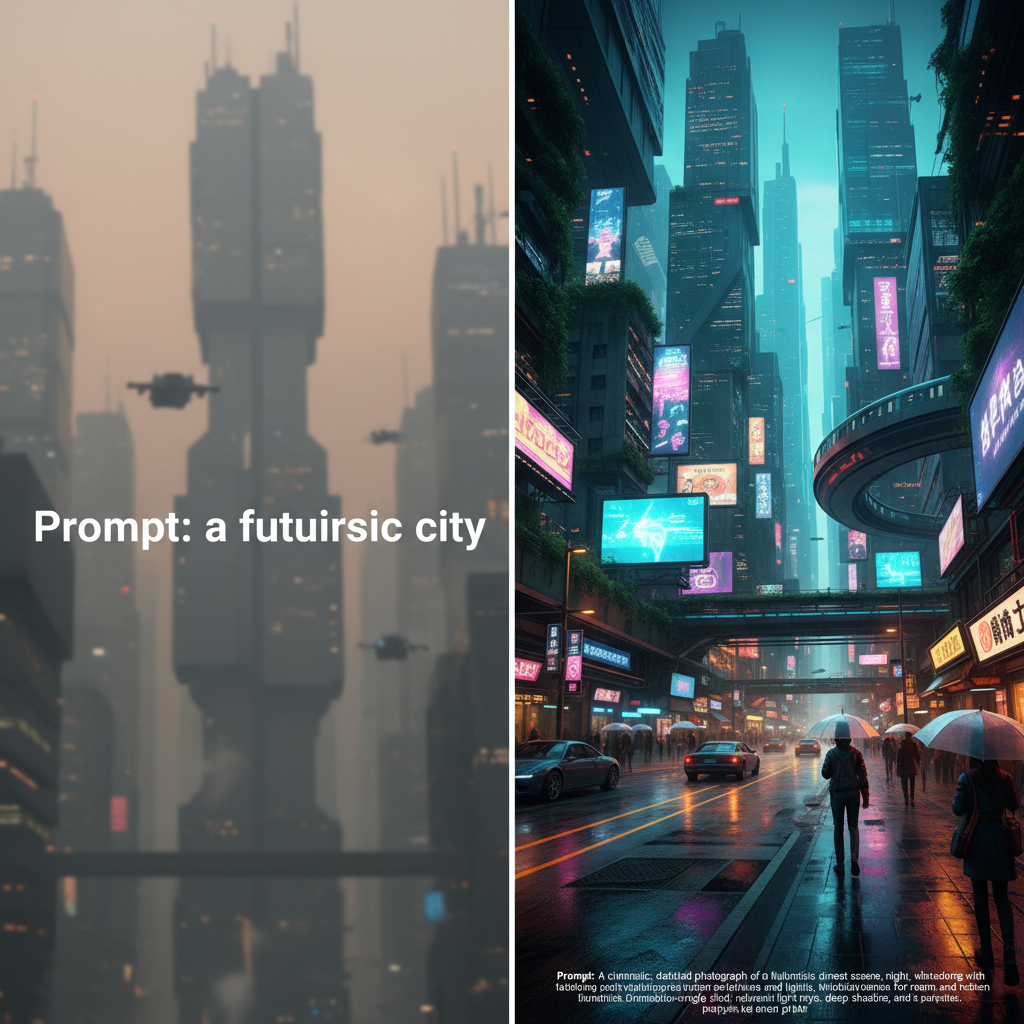
That’s when I realised my entire approach was wrong. I was talking to Midjourney like it was a search engine, a glorified Google Image search that could invent pictures. But it isn't. An AI image generator is a creative partner. More specifically, it’s your own personal, infinitely patient, slightly literal-minded film crew. You aren't meant to just 'prompt' it. You're meant to 'direct' it. You have to learn its language, and that language isn't English; it's the language of cinematography and art direction.
I decided to scrap my old prompts and start over, this time imagining I was on a film set. My goal wasn’t just to describe the 'what' but to dictate the 'how'. This shift in mindset changed everything.
The first thing I tackled was lighting. My initial prompt had no lighting direction, so the AI defaulted to its standard: bright, commercial, and boring. This time, I thought about the mood. I wanted something intimate and a little dramatic. I added “chiaroscuro lighting” to my prompt, a term from art history referring to strong contrasts between light and dark. I also specified the source: “light from a single desk lamp illuminating her face.”
Suddenly, the scene transformed. The background fell into shadow, creating a sense of intimacy and focus. The subject was no longer just a person in a room; she was the center of her own small universe. The generic apartment became a mysterious, personal space. I was getting closer.
Next, I thought about the camera. Who is telling this story? Where is the viewer? My first image was shot from a dead-on, eye-level perspective, which feels neutral and uninspired. For my new version, I wanted to convey a sense of strength and determination. I changed the virtual camera position. I added “low-angle shot” to the prompt. This simple change made the subject feel more powerful, monumental even, as if we were looking up to her. It’s a classic cinematic technique used to make characters feel heroic, and it worked wonders for the AI.
Then I considered the lens. A standard AI image often feels like it was shot with a default phone camera lens – everything is in focus, and there’s no sense of depth. Photographers and filmmakers use different lenses to create different feelings. A wide-angle lens can make a space feel vast or distorted, while a telephoto lens compresses the background, creating a sense of intimacy or surveillance. I wanted a natural, film-like feel, so I added “shot with a 35mm lens.” This is a classic focal length for street photography and cinema, known for providing a field of view that feels human and grounded. The result felt less like a render and more like a captured moment.
This is where it gets really fun. Now that I was thinking like a director, I could get obsessed with the details. Most AI images are too clean, too digital. Real life, and especially real film, has texture. It has grain. It has imperfect color. So I started specifying the film stock. This is perhaps the most powerful piece of vocabulary you can learn.
Instead of just saying “photorealistic,” I told Midjourney to emulate a specific type of photographic film. I prompted for “shot on Kodak Portra 400.” This is a legendary film stock famous for its beautiful, warm skin tones and fine grain. The effect was instantaneous. The image developed a soft, analogue warmth. The digital sterility vanished, replaced by a subtle, pleasing graininess. The colors shifted beautifully. Now it didn't just look *like* a photo; it *felt* like one. For a different project, I might ask for “Fujifilm Velvia,” known for its high saturation, to capture the vibrant colours of a market in Jaipur, or the stark, moody look of “Ilford HP5” for a black and white shot.
Finally, I addressed the composition and the environment. The “modern apartment” was the source of my stock-photo problem. Real apartments, especially in a place like Mumbai, are full of life and clutter. So, I changed the prompt to “cluttered, lived-in apartment with books and papers on the desk.” I also added a classic compositional rule: “rule of thirds.” This instructed the AI to place the subject off-center, making the image more dynamic and visually interesting than a simple, centered portrait.
I even added details about the world outside the window. Instead of a generic cityscape, I specified “the blurry glow of neon signs and passing autorickshaws seen through the window.” This not only grounded the image in a specific cultural context but also provided a beautiful secondary light source, adding depth and color to the shadows.
My final prompt was a monstrosity of a sentence. It looked something like this: “Cinematic film still of a young South Asian woman, focused, working at a cluttered desk in her moody Mumbai apartment, low-angle shot, dramatic chiaroscuro lighting from a single desk lamp, the blurry neon glow of the street seen through the window, shot on Kodak Portra 400, 35mm lens, grainy, atmospheric, rule of thirds composition --ar 16:9.”
The image that came back was everything the first one was not. It had a soul. It told a story. The woman felt real, the space felt authentic, and the mood was perfect. It wasn’t a picture *of* a woman working; it was a picture *about* ambition, focus, and the quiet solitude of modern work. I had finally created the image I actually wanted.
The lesson here is transformative for any non-artist trying to wrangle these incredible tools. Stop describing a noun and start directing a scene. Your vocabulary is the single most important asset you have. Don’t just say “dark,” say “chiaroscuro lighting” or “shot during golden hour.” Don’t just say “from the front,” say “low-angle shot” or “Dutch angle.” Don’t just say “realistic,” say “shot on Kodak Portra” or “style of a still from a Satyajit Ray film.”
Learning this new language gives you control. It allows you to build a consistent aesthetic across multiple images, creating a coherent visual identity for a project instead of a random grab-bag of AI-generated styles. It’s the difference between being a passive requester and an active creator. Whether you're in Bangalore trying to illustrate a blog post or in Boston creating a marketing campaign, the principle is the same. The AI is your studio, and it's waiting for your direction.
Why it matters
- 01Treat AI image generators like a creative director, not a search engine, by providing specific artistic instructions.
- 02Using technical terms for lighting, camera angles, and film stock is more effective than using simple descriptive adjectives.
- 03Combine multiple art direction commands into a single prompt to create a unique, consistent, and high-quality visual style.